👋 Introduction
You've chosen your cloud provider. You've planned your architecture. You've estimated your monthly bill. And then reality hits.
Your managed database costs are double what you expected. Your serverless workloads are unpredictably expensive. Your storage redundancy multipliers turned a $1,000 monthly bill into $3,000. You're left wondering: Did I miscalculate, or is the pricing just... different everywhere?
The answer? Both.
Cloud pricing isn't broken. It's multidimensional. Managed services on AWS, Azure, Google Cloud, Oracle, and DigitalOcean all price differently, measure capacity differently, and add surcharges in different places. Without a systematic way to compare, you're flying blind.
Let's talk about the hidden costs that blindside most teams, and why normalization matters more than you think.
🚨 The High Availability Surcharge: Your First Shock
When you move a database to the cloud, redundancy feels automatic. It's not.
Adding High Availability (HA) to a Google Cloud SQL instance doubles your costs. You read that right—the same instance, with HA enabled, costs 2x as much. Oracle MySQL HeatWave takes it further: a 3-node HA cluster triples the cost compared to a single-node deployment.
This catches founders and finance teams off guard. You've budgeted for a managed PostgreSQL instance at list price. Then during architecture review, your team recommends HA for production workloads, and the bill doubles or triples overnight.
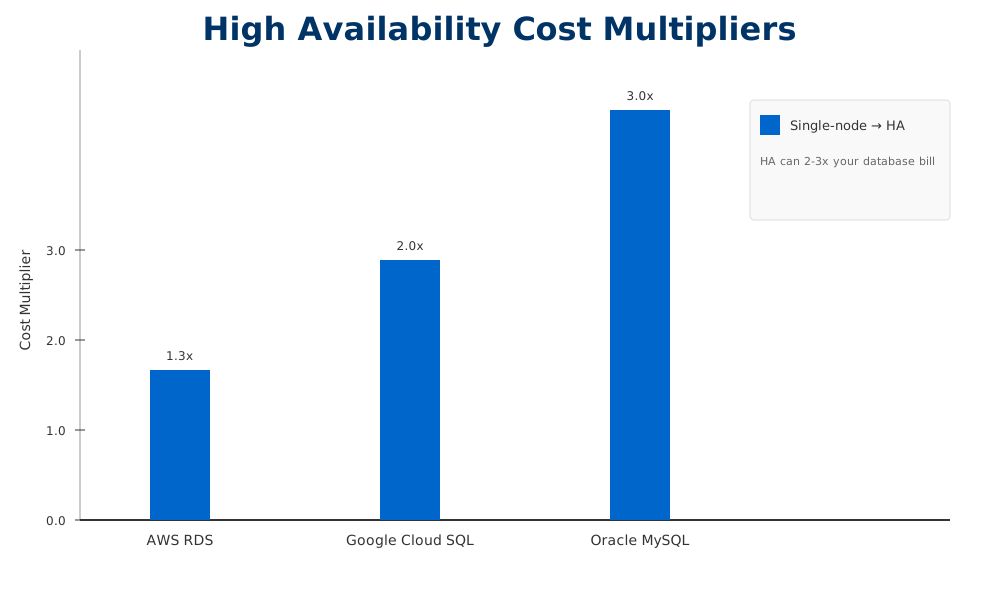
Image: HA adds significant cost multipliers across providers. AWS RDS 1.3x, Google Cloud SQL 2x, Oracle MySQL 3x.
The lesson here isn't that HA is bad—it's essential for production. The lesson is that HA pricing isn't standardized. You need to factor redundancy into your total costs from day one, not discover it mid-project.
💸 Managed Database Premiums: The Simplicity Tax
Now let's compare apples to apples.
An 8 vCPU / 30 GB PostgreSQL instance on Google Cloud SQL costs approximately $0.39 per hour. A comparable 8 vCPU / 32 GB managed database on DigitalOcean costs over $0.72 per hour—nearly double.
Why the difference? Some of it is engineering and support. Some of it is market positioning. But for teams running tight FinOps budgets, that gap can mean thousands of dollars monthly.
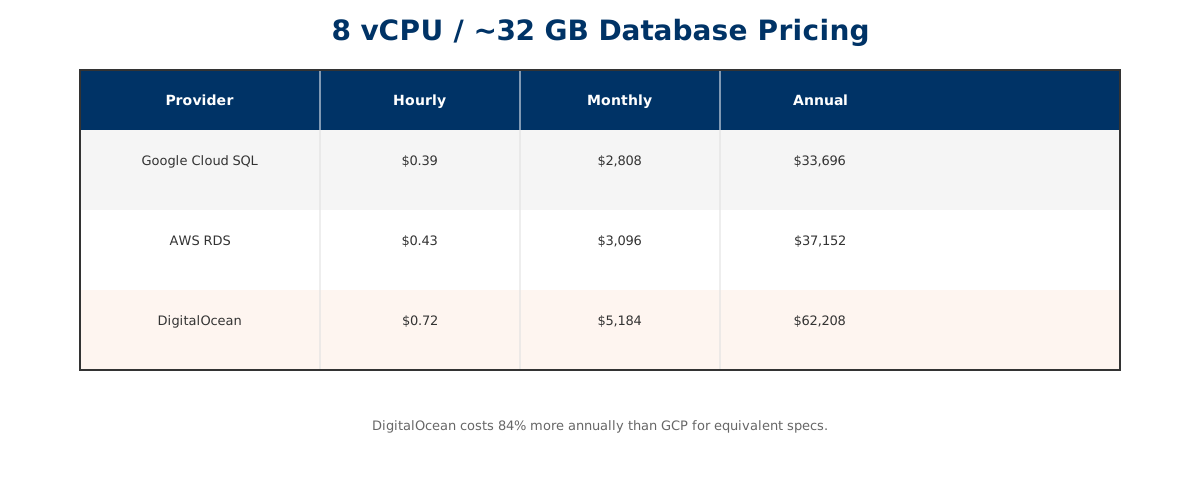
Image: Same specs across providers: Google Cloud SQL at $0.39/hr vs. DigitalOcean at $0.72/hr—an 84% annual cost difference.
The question isn't "which is cheapest?" It's "which is right for your workload and budget?" A simpler provider might justify the premium if it reduces your operational overhead. But you need to make that trade-off consciously, not discover it after migration.
🎢 Serverless Database Billing: The Unpredictability Problem
Serverless databases promise auto-scaling and pay-as-you-go pricing. They deliver—but the bill might surprise you.
Oracle's Autonomous Database charges $0.336 per ECPU-hour for serverless workloads. With auto-scaling, you pay only for capacity you actually use. That sounds great until your workload spikes and your ECPU consumption triples overnight. Your bill follows, unpredictably.
Compare this to a provisioned PostgreSQL instance: your costs are fixed and predictable. You know exactly what you'll pay each month. Serverless offers flexibility; provisioned offerings offer certainty. Which you need depends on your business model and risk tolerance.
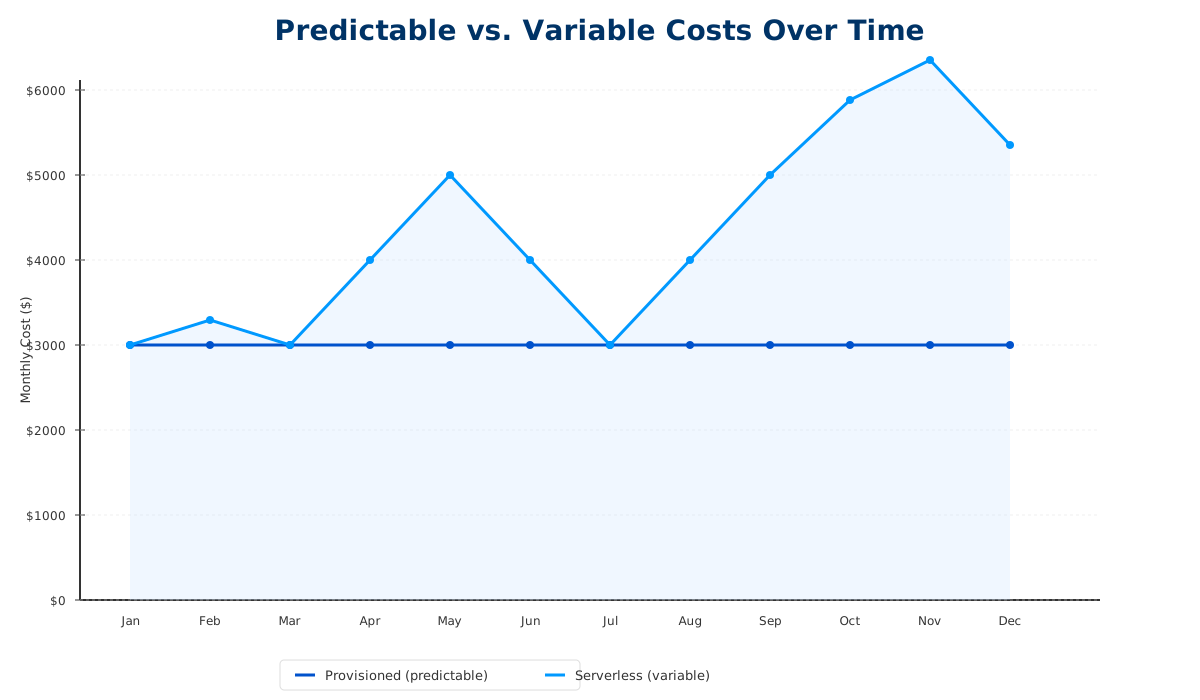
Image: Provisioned instances maintain flat monthly costs. Serverless auto-scaling can cause costs to spike 2-3x during demand peaks.
The hidden cost of serverless isn't the per-unit pricing—it's the operational complexity of managing variable costs and the potential for bill shock when demand spikes.
🔒 Proprietary vs. Open Source: Locking In at 3x Cost
Here's where things get strategic.
Every cloud provider offers proprietary database engines alongside open-source options. AWS has DynamoDB and Aurora alongside PostgreSQL. Azure has Cosmos DB. Google has Firestore alongside Bigtable. Oracle has its proprietary NoSQL alongside open-source MySQL and PostgreSQL.
Proprietary databases offer managed features and deep integration with their ecosystem. They also lock you in—switching costs are high, and pricing reflects that. When you compare a NoSQL workload on Cosmos DB to the same workload on an open-source alternative at scale, you can see a 3x cost difference. Sometimes more.
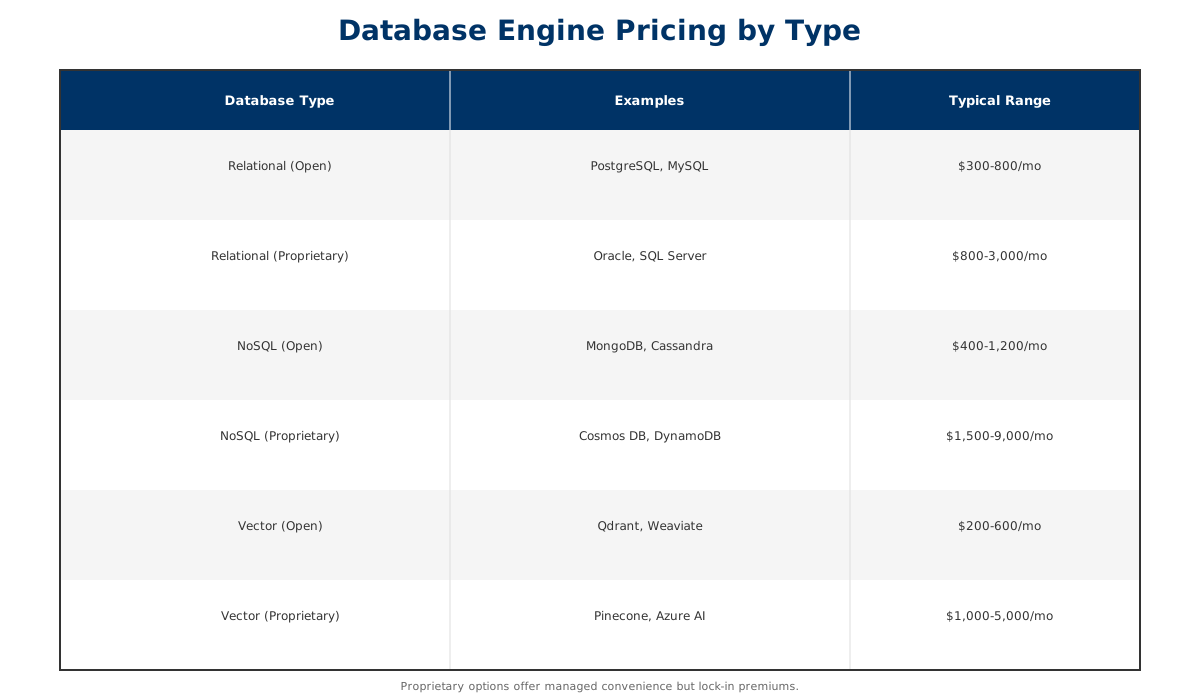
Image: Open-source databases range from $300-600/mo while proprietary options (Oracle, Cosmos DB) run $800-9,000/mo—the lock-in premium.
This isn't an argument against proprietary databases. It's an argument for making an informed choice. If you're betting your architecture on a proprietary service, you're also betting that the cost-benefit remains favorable as you scale. Many teams find it doesn't.
🧩 The Data Normalization Challenge: Why Comparisons Are Impossible (Without Help)
Here's the core problem: No two providers use the same naming conventions, capacity units, or pricing models.
AWS measures compute in vCPUs and ECUs. Azure uses vCPUs and ACUs. Google uses vCPUs and shares. DigitalOcean uses vCPUs. Oracle uses OCPUs. Every provider measures memory differently. Every provider defines "standard" vs. "optimized" differently. Every provider bundles features differently.
When you compare a workload across providers manually, you're not comparing like-to-like. You're comparing your interpretation of one provider's pricing model against another's. And those interpretations are almost always off.
This is why systematic normalization exists.
At Compare Cloud Costs, we aggregate and normalize pricing data across AWS, Azure, Google Cloud, Oracle, DigitalOcean, and Alibaba Cloud (see our status page). We translate every provider's naming convention into a standard unit: actual compute capacity, actual memory, actual throughput. We then price the same workload against each provider and show you the real comparison.
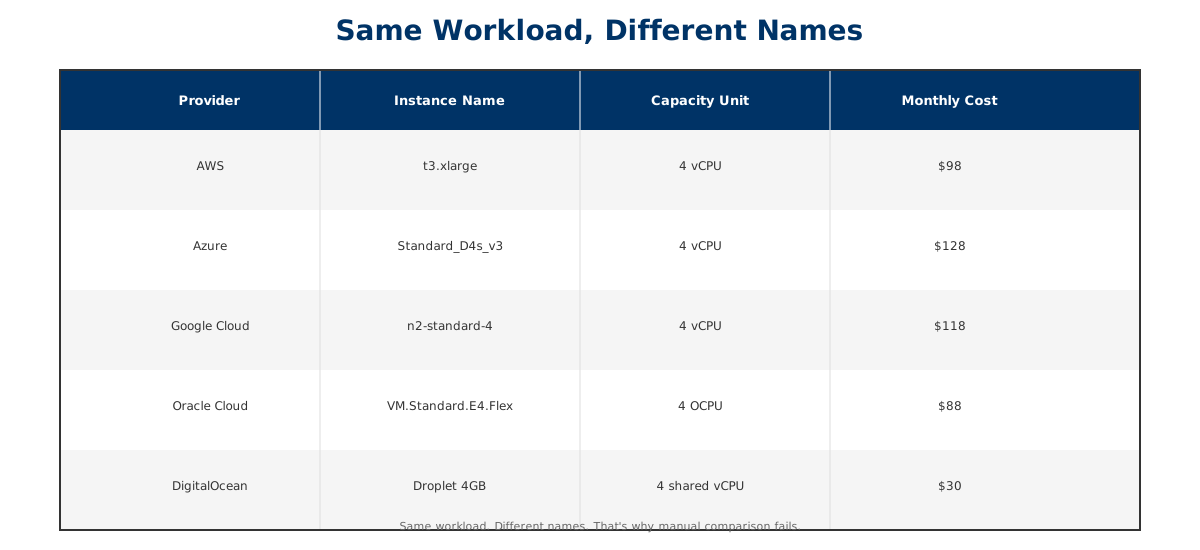
Image: The same 4 vCPU workload has five different names across five providers—and five different monthly prices ranging from $30 to $128.
Finding the cheapest cloud VM shouldn't require a data science degree. But without normalization, it does.
💾 Storage Redundancy Multipliers: The Invisible Cost Driver
Let's talk about storage, because it adds another dimension to the puzzle.
Cloud storage pricing isn't just about capacity. It depends on redundancy:
- Single-Zone Storage: Cheapest, but no cross-zone protection.
- Zone-Redundant Storage: Costs more; protects against zone failures.
- Geo-Redundant Storage: Most expensive; protects against regional outages.
The cost multipliers vary by provider. On Azure, switching from Single-Zone to Zone-Redundant Storage adds 50% to your bill. Switching to Geo-Redundant adds 100% or more. AWS has similar multipliers with different names (Standard vs. Standard-IA vs. Glacier).
For large-scale storage workloads (petabytes, not terabytes), these multipliers compound. A workload that costs $5,000/month on Single-Zone storage might cost $10,000-15,000/month with geo-redundancy. That's not a bug; it's the price of reliability. But you need to budget for it.
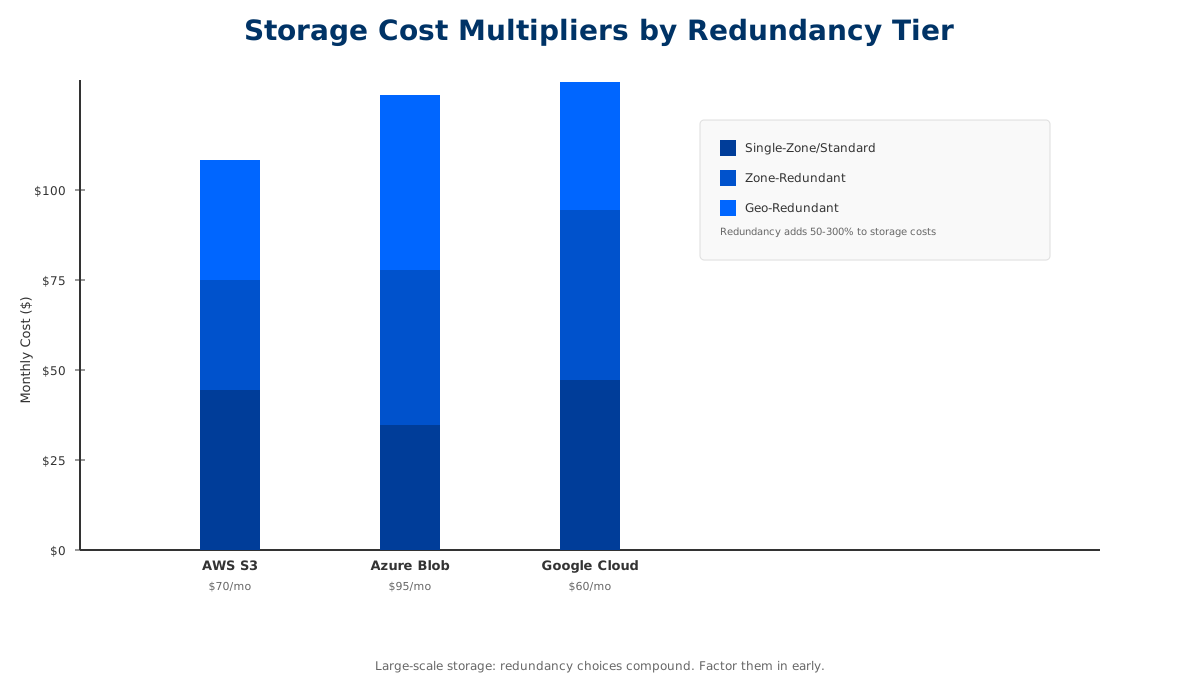
Image: Geographic redundancy adds 50-100% to storage costs. Budget for it upfront, especially at scale.
🏗️ Putting It Together: The Real Cost of Managed Services
You chose managed services for good reasons: reduced operational overhead, built-in reliability, simplified scaling. Those benefits are real. But they come with hidden costs—surcharges for HA, premiums for simplicity, unpredictability in serverless, lock-in with proprietary databases, and multipliers across storage tiers.
The teams that manage cloud costs well don't try to guess. They systematize. They compare workloads across providers. They factor in redundancy, HA, and storage tiers upfront, not mid-project. And they revisit those decisions quarterly as their workload evolves.
The first step? Seeing the real costs clearly.
That's what Compare Cloud Costs does. Run a benchmark of your database, compute, or storage workload. See how it prices across AWS, Azure, Google Cloud, and other providers. Download the comparison CSV. Share it with your team. Then decide—consciously, with data—which provider offers the best value for your specific workload.
Because cloud cost optimization isn't about picking the cheapest provider. It's about picking the right provider for the right workload, and knowing exactly what it will cost.
🚀 See for yourself
Run the comparison yourself → No signup. Compare a workload across AWS, Azure, Google Cloud, Oracle, DigitalOcean, and Alibaba Cloud in minutes, and download the results as a CSV.
For tech consulting firms and ISVs: If you're helping your customers navigate cloud partnerships—or building your own co-sell strategy with AWS, GCP, or Azure—this benchmark becomes a tool you can offer them. Learn how Co-Sell Plus helps tech firms scale their cloud GTM → and contact us at [email protected].